 ML Specialization
Gradient Descent for Logistic Regression
This section covers Gradient Descent for Logistic Regression
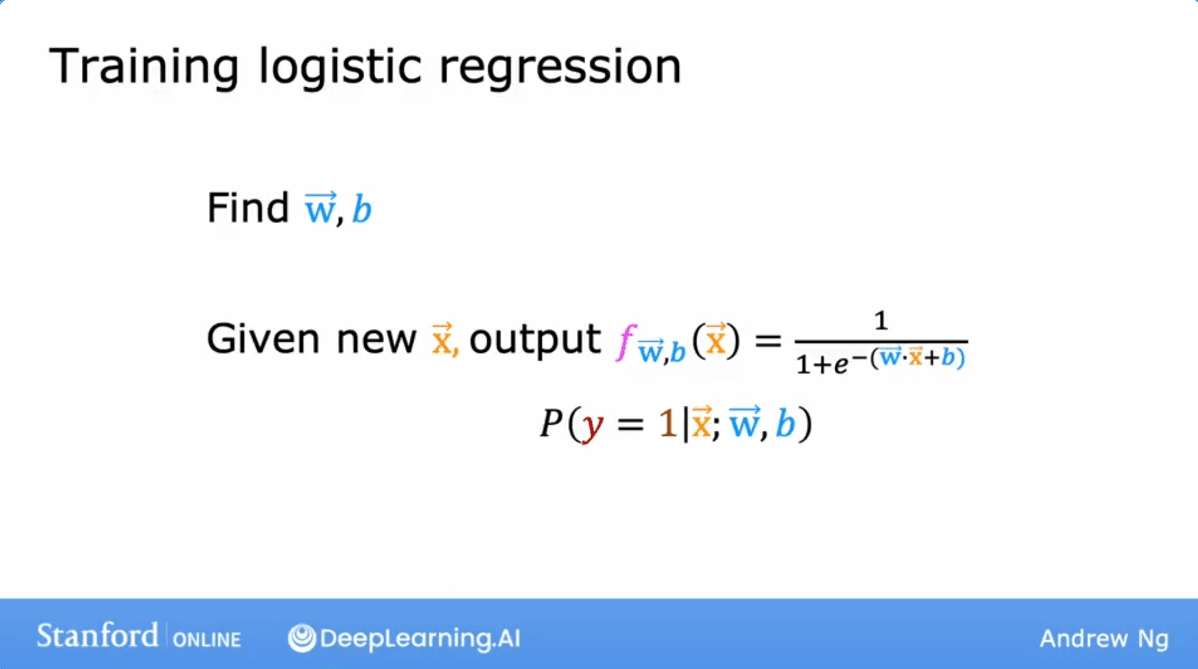
Training Logistic Regression
Our goal is to find the optimal values for parameters and so that, given an input , the model can accurately predict whether the label is .
Gradient Descent Algorithm
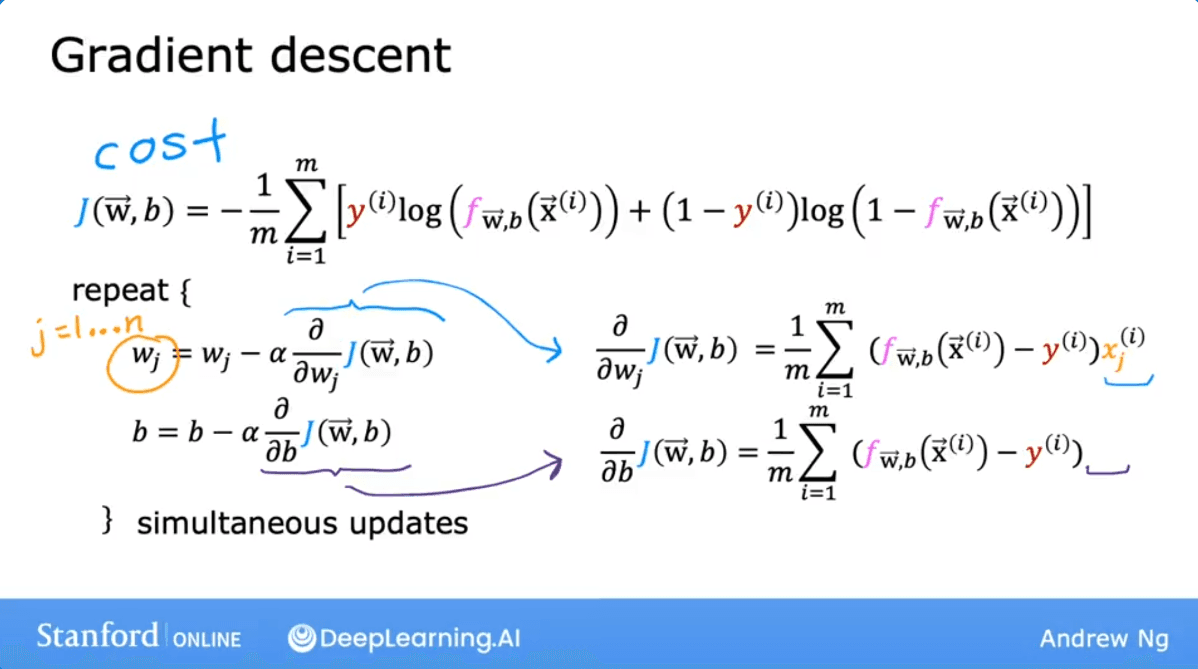
To find these parameters, we use the Gradient Descent algorithm. This involves defining a cost function and iteratively updating the parameters to minimize that cost.
The Cost Function
The cost function for logistic regression is defined as:
Update Rules
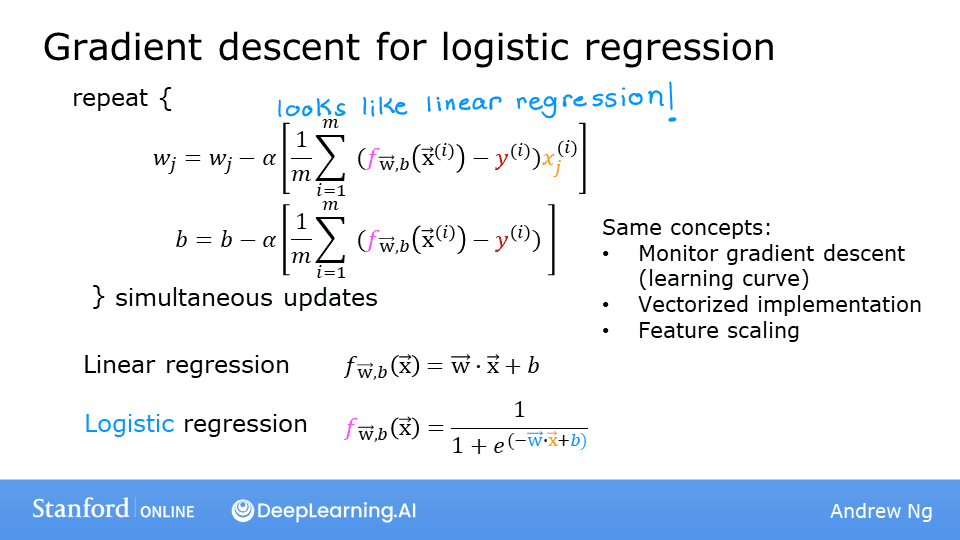
In Gradient Descent, we simultaneously update parameters and until convergence:
Derivation of Derivatives
The partial derivatives used in the update steps are derived as follows:
Comparison with Linear Regression
Interestingly, the update formulas for Logistic Regression look identical to those for Linear Regression:
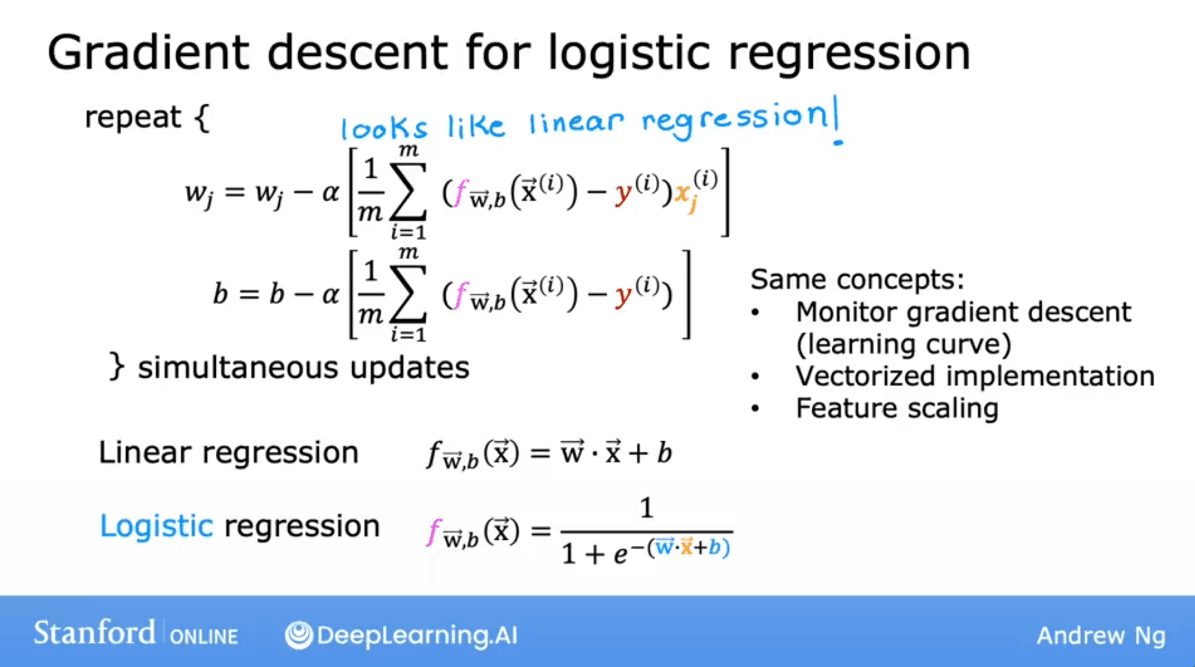
However, the key difference lies in the definition of the model :
- Linear Regression:
- Logistic Regression:
(where is the sigmoid function).
Lab: Gradient Descent for Logistic Regression
In this lab, we will:
- Implement gradient descent for logistic regression.
- Explore the algorithm on a familiar dataset.
1. Data Setup and Visualization
We start with the same two-feature dataset used in previous decision boundary labs.
import copy, math
import numpy as np
# %matplotlib widget
import matplotlib.pyplot as plt
from lab_utils_common import dlc, plot_data, plt_tumor_data, sigmoid, compute_cost_logistic
from plt_quad_logistic import plt_quad_logistic, plt_prob
plt.style.use('./deeplearning.mplstyle')

# Data set
X_train = np.array([[0.5, 1.5], [1,1], [1.5, 0.5], [3, 0.5], [2, 2], [1, 2.5]])
y_train = np.array([0, 0, 0, 1, 1, 1])

# Plotting the data
fig, ax = plt.subplots(1, 1, figsize=(4,4))
plot_data(X_train, y_train, ax)

ax.axis([0, 4, 0, 3.5])
ax.set_ylabel('$x_1$', fontsize=12)
ax.set_xlabel('$x_0$', fontsize=12)
plt.show()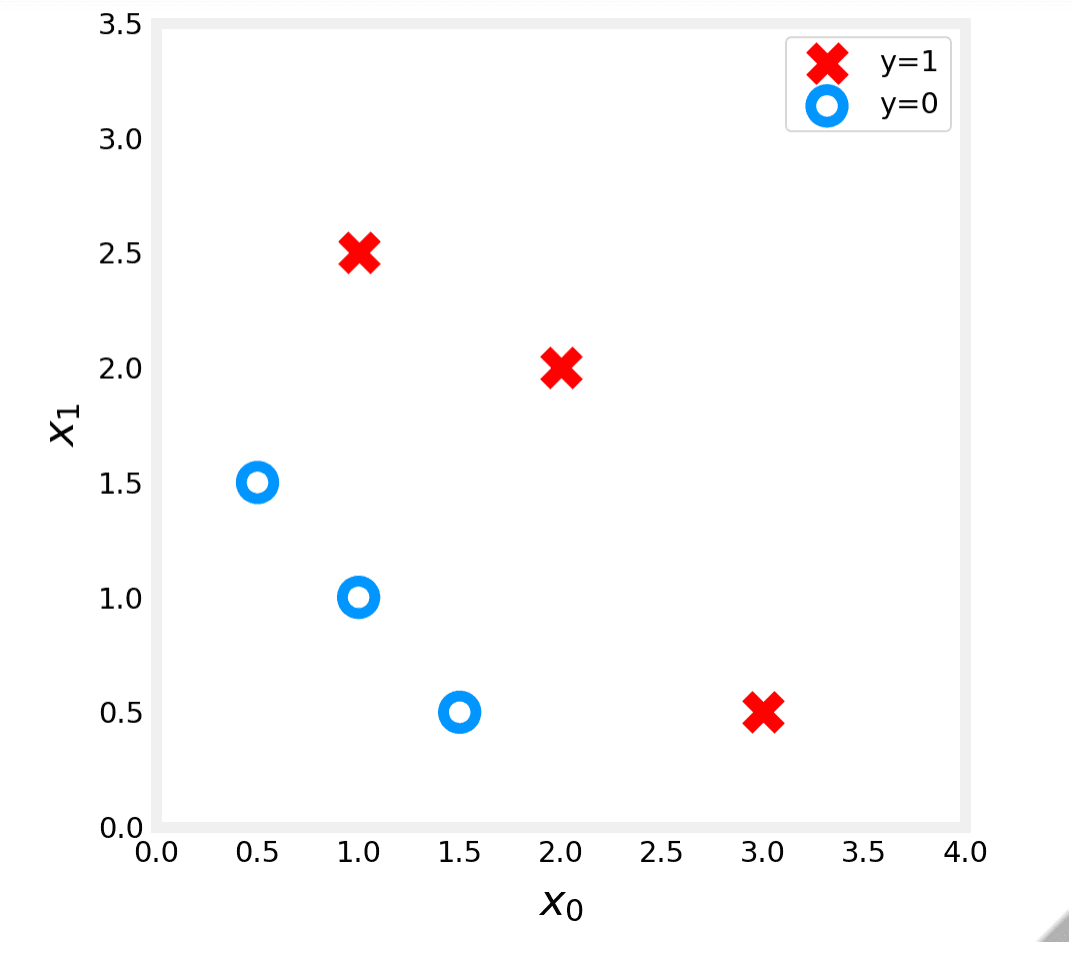
2. Implementation Details
Recall the gradient descent algorithm:
Where the gradients are calculated as:
Key Terms:
- : The -th feature of the -th training example.
- : Number of training examples.
- : The model prediction using the sigmoid function .
Step A: Calculating the Gradient (compute_gradient_logistic)
This function implements equations (2) and (3).
Algorithm:
- Initialize
dj_dwanddj_db. - Iterate over every example :
- Calculate error:
- Update
dj_db: sum the error. - Iterate over features :
- Update
dj_dw[j]: sum the error multiplied by feature .
- Update
- Divide accumulated gradients by .
def compute_gradient_logistic(X, y, w, b):
    """
    Computes the gradient for logistic regression

    Args:
      X (ndarray (m,n): Data, m examples with n features
      y (ndarray (m,)): target values
      w (ndarray (n,)): model parameters
      b (scalar)      : model parameter
    Returns
      dj_dw (ndarray (n,)): The gradient of the cost w.r.t. the parameters w.
      dj_db (scalar)      : The gradient of the cost w.r.t. the parameter b.
    """
    m,n = X.shape
    dj_dw = np.zeros((n,))                           #(n,)
    dj_db = 0.

    for i in range(m):
        f_wb_i = sigmoid(np.dot(X[i],w) + b)          #(n,)(n,)=scalar
        err_i  = f_wb_i  - y[i]                       #scalar
        for j in range(n):
            dj_dw[j] = dj_dw[j] + err_i * X[i,j]      #scalar
        dj_db = dj_db + err_i
    dj_dw = dj_dw/m                                   #(n,)
    dj_db = dj_db/m                                   #scalar

    return dj_db, dj_dw
Testing the function:
X_tmp = np.array([[0.5, 1.5], [1,1], [1.5, 0.5], [3, 0.5], [2, 2], [1, 2.5]])
y_tmp = np.array([0, 0, 0, 1, 1, 1])
w_tmp = np.array([2.,3.])
b_tmp = 1.
dj_db_tmp, dj_dw_tmp = compute_gradient_logistic(X_tmp, y_tmp, w_tmp, b_tmp)
print(f"dj_db: {dj_db_tmp}" )
print(f"dj_dw: {dj_dw_tmp.tolist()}" )
Output:
dj_db: 0.49861806546328574
dj_dw: [0.498333393278696, 0.49883942983996693]
Step B: Gradient Descent Loop (gradient_descent)
This function implements equation (1), repeatedly updating and .
def gradient_descent(X, y, w_in, b_in, alpha, num_iters):
    """
    Performs batch gradient descent

    Args:
      X (ndarray (m,n)   : Data, m examples with n features
      y (ndarray (m,))   : target values
      w_in (ndarray (n,)): Initial values of model parameters
      b_in (scalar)      : Initial values of model parameter
      alpha (float)      : Learning rate
      num_iters (scalar) : number of iterations to run gradient descent

    Returns:
      w (ndarray (n,))   : Updated values of parameters
      b (scalar)         : Updated value of parameter
    """
    # An array to store cost J and w's at each iteration primarily for graphing later
    J_history = []
    w = copy.deepcopy(w_in)  #avoid modifying global w within function
    b = b_in

    for i in range(num_iters):
        # Calculate the gradient and update the parameters
        dj_db, dj_dw = compute_gradient_logistic(X, y, w, b)

        # Update Parameters using w, b, alpha and gradient
        w = w - alpha * dj_dw
        b = b - alpha * dj_db

        # Save cost J at each iteration
        if i<100000:      # prevent resource exhaustion
            J_history.append( compute_cost_logistic(X, y, w, b) )

        # Print cost every at intervals 10 times or as many iterations if < 10
        if i% math.ceil(num_iters / 10) == 0:
            print(f"Iteration {i:4d}: Cost {J_history[-1]}   ")

    return w, b, J_history         #return final w,b and J history for graphing
Running Gradient Descent:
w_tmp = np.zeros_like(X_train[0])
b_tmp = 0.
alph = 0.1
iters = 10000

w_out, b_out, _ = gradient_descent(X_train, y_train, w_tmp, b_tmp, alph, iters)
print(f"\nupdated parameters: w:{w_out}, b:{b_out}")
Output:
Iteration    0: Cost 0.684610468560574
Iteration 1000: Cost 0.1590977666870456
Iteration 2000: Cost 0.08460064176930081
Iteration 3000: Cost 0.05705327279402531
Iteration 4000: Cost 0.042907594216820076
Iteration 5000: Cost 0.034338477298845684
Iteration 6000: Cost 0.028603798022120097
Iteration 7000: Cost 0.024501569608793
Iteration 8000: Cost 0.02142370332569295
Iteration 9000: Cost 0.019030137124109114

updated parameters: w:[5.28 5.08], b:-14.222409982019837
3. Visualizing the Decision Boundary
We can plot the probability shading and the decision boundary (where probability = 0.5) to see how well our model fits the data.
fig,ax = plt.subplots(1,1,figsize=(5,4))

# plot the probability
plt_prob(ax, w_out, b_out)

# Plot the original data
ax.set_ylabel(r'$x_1$')
ax.set_xlabel(r'$x_0$')
ax.axis([0, 4, 0, 3.5])
plot_data(X_train,y_train,ax)

# Plot the decision boundary
x0 = -b_out/w_out[0]
x1 = -b_out/w_out[1]
ax.plot([0,x0],[x1,0], c=dlc["dlblue"], lw=1)
plt.show()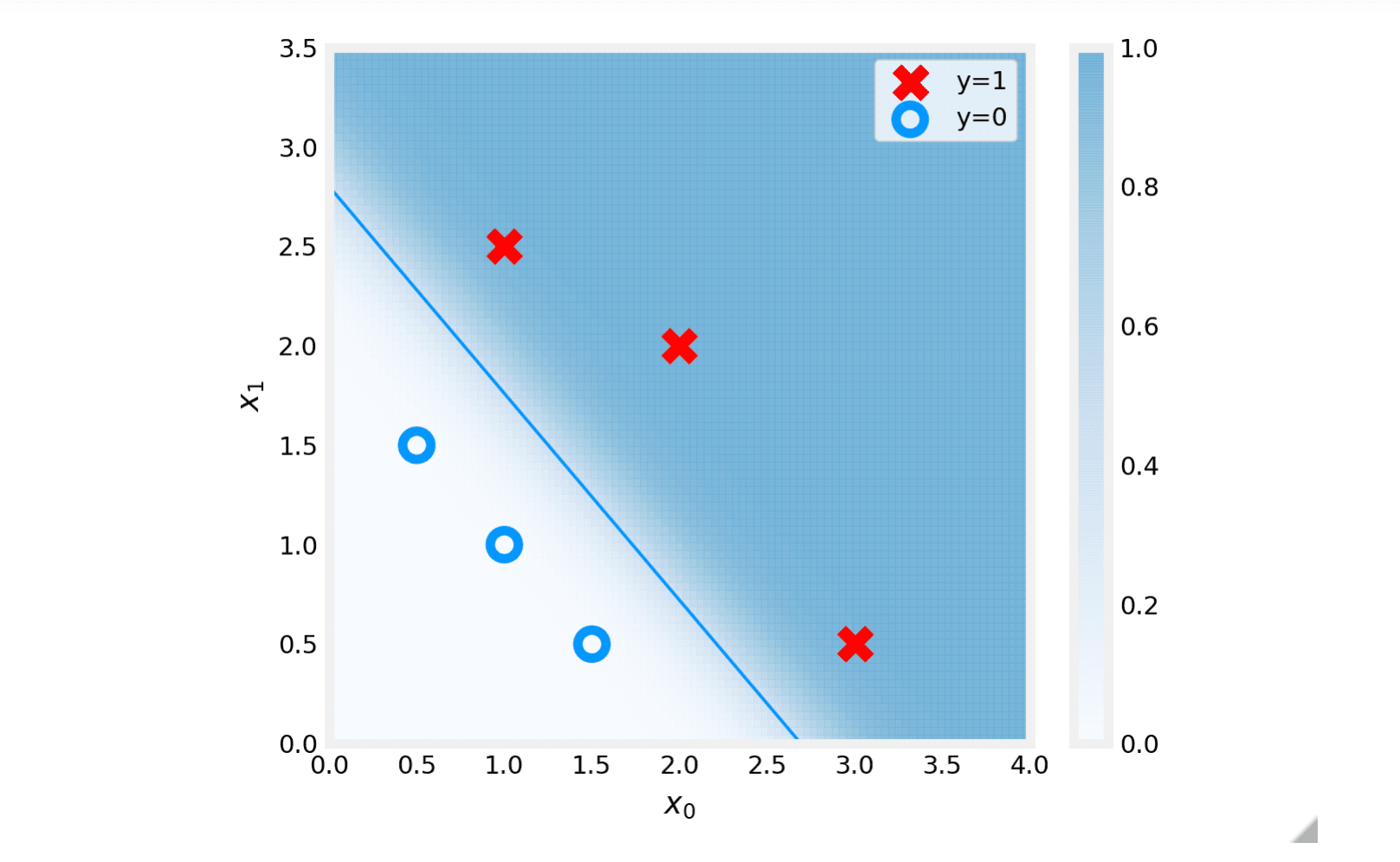
4. Exploring Cost Function with a Single Variable
To better understand gradient descent, let's visualize the cost function contours using a simpler, one-variable dataset.
x_train = np.array([0., 1, 2, 3, 4, 5])
y_train = np.array([0,  0, 0, 1, 1, 1])

fig,ax = plt.subplots(1,1,figsize=(4,3))
plt_tumor_data(x_train, y_train, ax)
plt.show()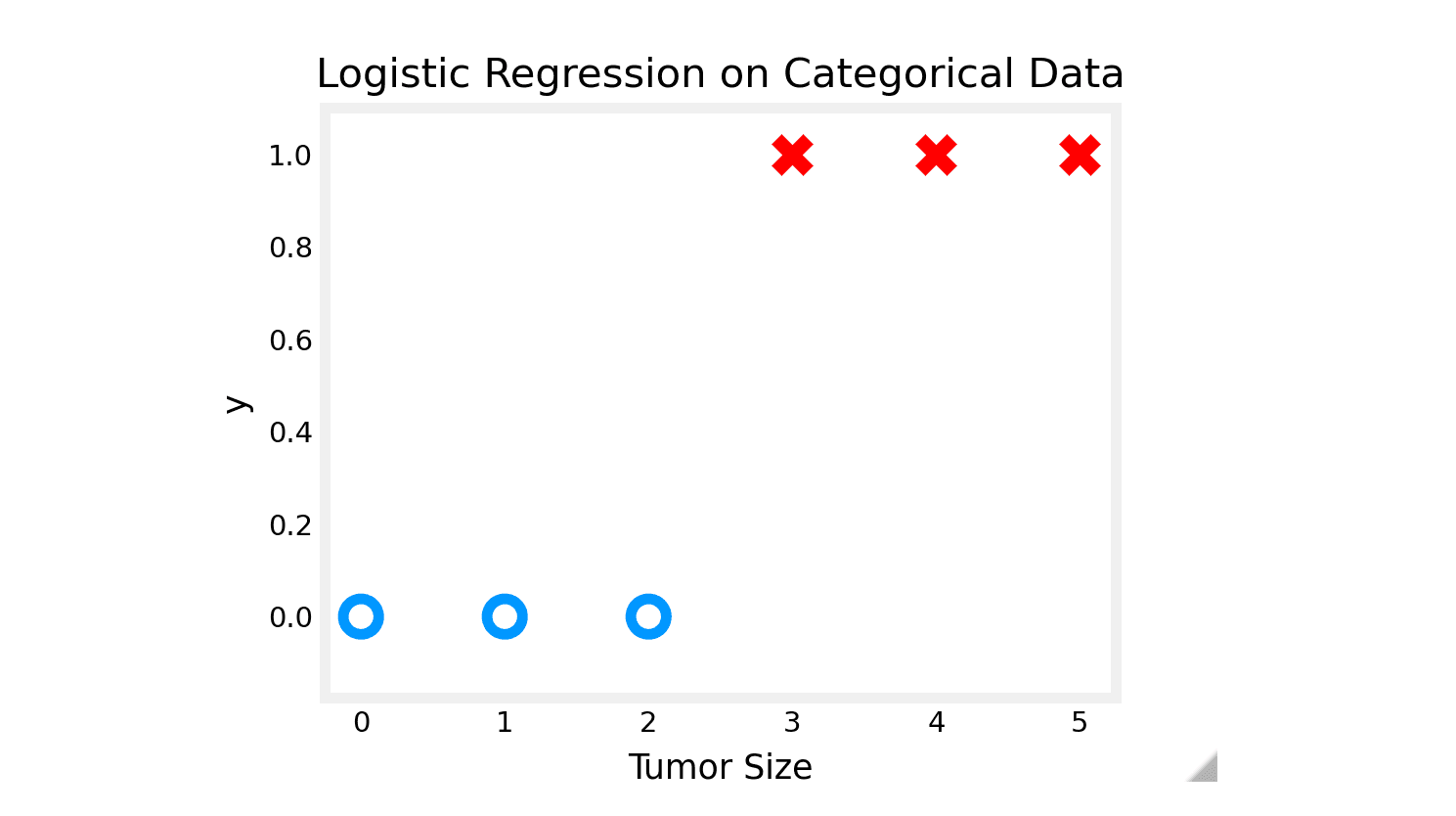
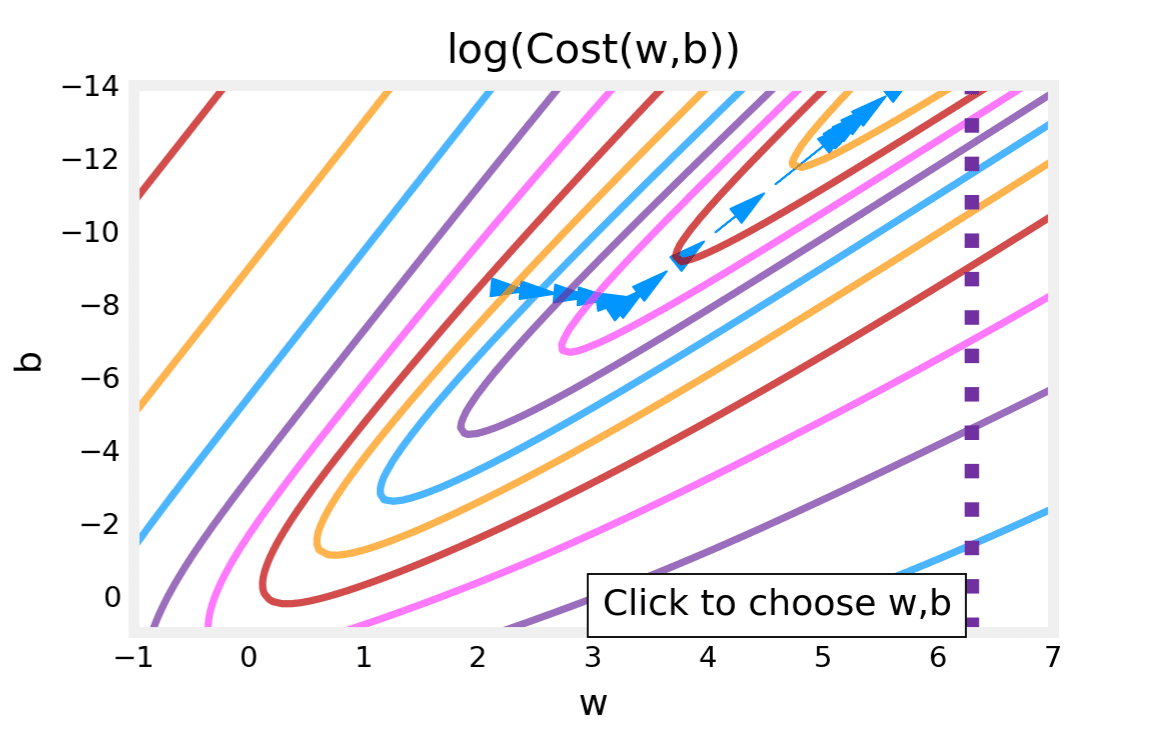
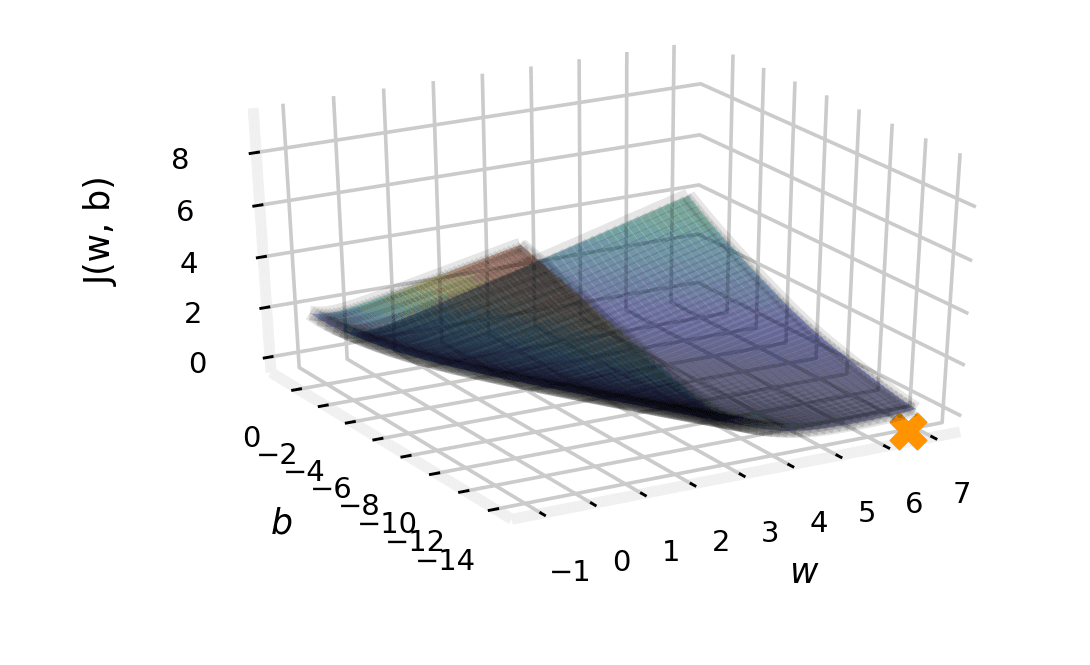
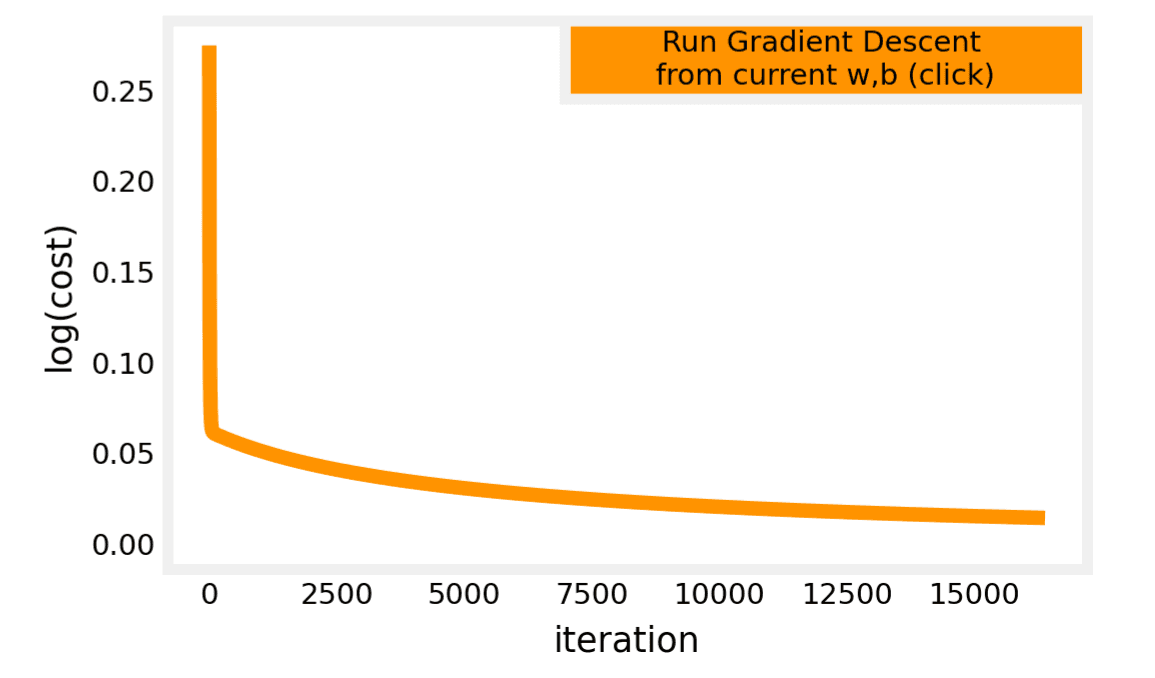
Interactive Exploration:
- In the contour plot, the cost is calculated based on the loss of each example (vertical dotted lines).
- As gradient descent runs, you can observe the cost steadily decreasing.
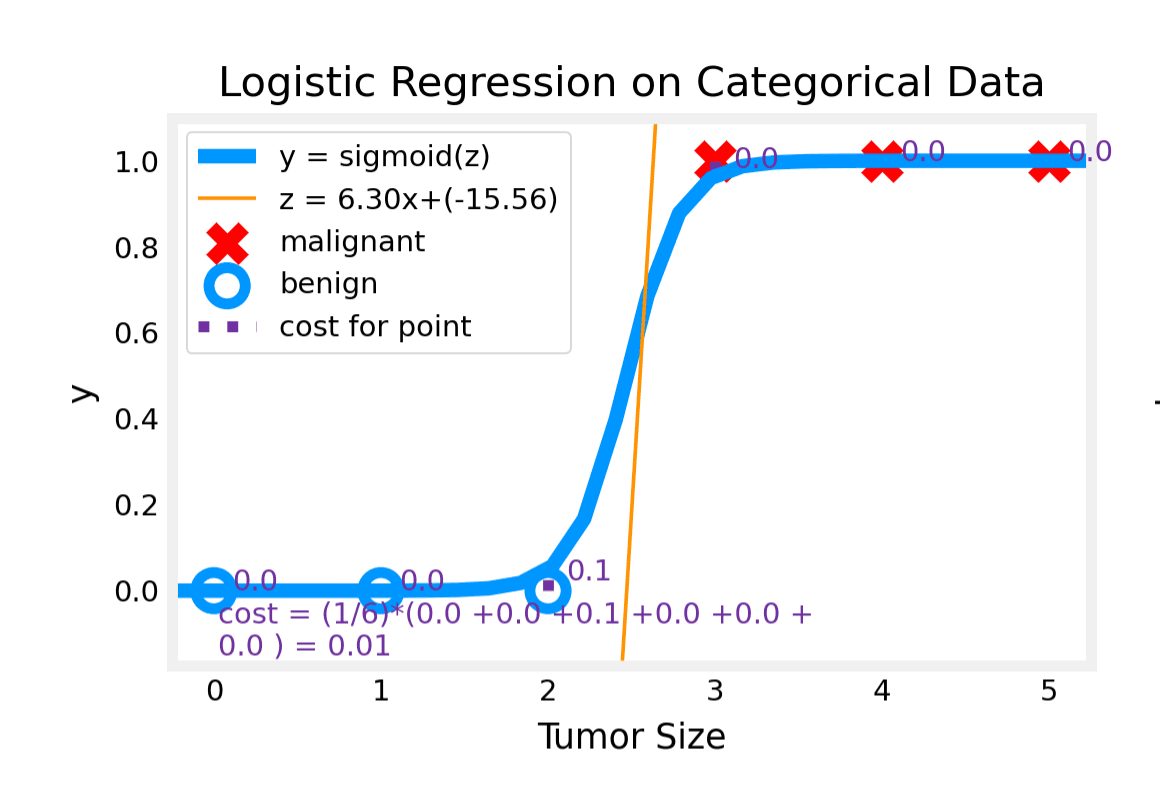
Contour and Cost Plots:
Logistic Regression with Scikit-Learn
In this section, we will train a logistic regression model using the popular library scikit-learn.
1. Data Preparation
import numpy as np

X = np.array([[0.5, 1.5], [1,1], [1.5, 0.5], [3, 0.5], [2, 2], [1, 2.5]])
y = np.array([0, 0, 0, 1, 1, 1])
2. Fit the Model
We use the LogisticRegression class. The .fit() method trains the model.
from sklearn.linear_model import LogisticRegression

lr_model = LogisticRegression()
lr_model.fit(X, y)
Output:
LogisticRegression(C=1.0, class_weight=None, dual=False, fit_intercept=True,
                   intercept_scaling=1, l1_ratio=None, max_iter=100,
                   multi_class='auto', n_jobs=None, penalty='l2',
                   random_state=None, solver='lbfgs', tol=0.0001, verbose=0,
                   warm_start=False)
3. Make Predictions
We can check the model's predictions using the .predict() method.
y_pred = lr_model.predict(X)
print("Prediction on training set:", y_pred)
Output:
Prediction on training set: [0 0 0 1 1 1]4. Calculate Accuracy
The .score() method calculates the accuracy of the model on the given data.
print(f"Accuracy on training set: {lr_model.score(X, y)}")Output:
Accuracy on training set: 1.0Quiz
Question 1: Which of the following two statements is a more accurate statement about gradient descent for logistic regression?
A. The update steps are identical to the update steps for linear regression. B. The update steps look like the update steps for linear regression, but the definition of is different.
Answer: Correct: B
Reasoning: For logistic regression, is the sigmoid function (), whereas in linear regression, it is a simple linear combination ().